How To Create Pin Images That Drive Traffic To Your Site! (updated 2025)
(UPDATED for 2025)
Struggling to drive traffic to your site from Pinterest? Learn what makes a successful pins that will drive traffic your website!
I’ve tested 1000s of different images on Pinterest, studied other successful pins and I’ve found that there are definitely key elements that you can incorporate to increase your chances of engagement and send traffic to your site, read on!
Tips for making Pinterest pins that get engagement and drive traffic to your website
When I was looking at other advice for making ‘viral’ images or how to create clickable Pinterest images I couldn’t find any that actually showed their stats. Don’t get me wrong most of the advice was good but we want to see that it actually works right?
So I’m sharing a few of my most successful pins (these are older and I’ll add newer stats below, however much of the same tips and advice remain the same). All of them fall under the same pin style that I’ve found to do really well for driving traffic to your site.

Just before I go on you might be wondering why the date on the pin says : “published 29 October 2017”. That’s not very recent? That’s the date the blog post was first published but I regularly create new pins for landing pages that drive lots of traffic and this is one of them.
It’s a good idea to make new pin images for landing pages, especially if they bring in a lot of traffic. If you have a varied audience (like a lifestyle blogger for instance) it’s also a good idea to make different images that appeal to different sections of your audience.
Pinterest have provided some guidance for creating good pins in this Creative Best Practices Guide.
Some of the pin image basics:
- Pins should be portrait (see more about pin formats here) with a 2:3 ratio. I like to go 1000 x 1500 pixels (or 1200 x1800) and I know that other successful pinners like this ratio too.
- Add branding– use the same colour scheme, fonts, logo and aesthetic as your site/landing page. A pinner’s journey is important so creating consistency is key. (But also don’t be afraid to play about with different pin styles. The nature of Pinterest means you can test a lot and play more, which I love). Pinterest use something called ‘pin cohesion’ in their algorithms, it’s important that expectation is met from pin to page. (Read more about pin cohesion and SEO here)
- Good imagery– the more eye-catching the better! Your pin has to stand out and appeal to the pinner you’re trying to attract. See this post on attracting your right audience for more details.
- Remember we only have a short space of time to attract someone to our pin. This is also why it’s a great idea to test different styles including video, collage, static images, textual overlays and so on. Don’t be afraid to test on Pinterest, play with different pin styles, have fun with it!
These are all great foundations but we can also do more to make our pins click-worthy.
What Makes Pin Images Clickable?
There are some key elements that go into a pin that drives traffic to the landing page. Those are:
- Text overlay
- Multiple, clear images
- Call To Action
Let’s have a look at these different elements of a pin below:
ADDING TEXTUAL OVERLAY TO YOUR PIN
Let’s dig into those a little deeper. We’ll start with Text Overlay. Without doubt this is one of the biggest things you should add to a pin to get someone onto your site. Typically pins with text on them drive more traffic and pins without tend to get more saves- which is great for the Pinterest algorithm.
Text overlay gives further context and meaning to the image. (As an aside; Pinterest can also ‘read’ the text overlay which further helps Pinterest categorise and push pins so it’s good to include for SEO purposes too).
Text overlay gives further context and meaning to the image“
Bold, clear font works best. Most people scroll Pinterest on a mobile device so optimise your pin images with that in mind. I try to stick to the same few fonts as it’s also good for brand awareness.
Too much text doesn’t work. You have to condense what the pin is about and why it should be clicked into a few words. This will take practice and I am always trying different phrasing to see what works best.“
WORDS ON PINS THAT DRIVE MORE ENGAGEMENT ARE:
- Be personable. Use things like “I”, “My”, “I’ve tried”, “My Favourite” etc. Pinners like to get recommendations from other pinners. Use a tone that is friendly and authentic.
- Words/phrases like “new”, “best”, “love”, “favourite”, “must-try”, “don’t miss”, “step by step”, “how to”, “easy”, “quick” etc work really well.
- Think about what gets you clicking and use those ideas. “Be the pinner, think like the pinner” – Descartes (honestly).

Create Multiple Image Pins for Higher Click through Rate
Pins that have more than one image get clicked more. In fact according to Pinterest, pins with multiple images have a 30% higher clickthrough rate than pins with just one image (pins with one image tend to be saved more).
I’ve definitely found this to be the case with my own pins, my clients’ pins and observing other successful pins. I use Canva to easily make these types of pins for myself and my clients (see more about my Pinterest Services here). Give it a try!
Add a Call To Action (CTA) on Pins
Adding a soft call to action get’s people…acting. Words that get people clicking are things like “free”, “new”, “for a short time”, “what about you” , “give it a try!” and similar. Don’t be pushy though, that is a sure fire way of losing people’s attention.
Be enticing and pique interest- like my The Ordinary foundation pin above. Have a look at what get’s you acting on things you see and adapt for your own needs.

The above Mario Badescu facial spray pin is a bit of an anomaly compared to the other clickable images I’ve spoke about. The landing page that it links to is one of my most trafficked pages from Pinterest (it’s this review of Mario Badescu Facial Sprays here).
It’s a pin I think about a lot. I find it fascinating for numerous reasons. I knocked it up in a couple of minutes without giving it much thought. It’s a cropped image than I made longer to see what would happen. It’s definitely not 2:3 in ratio. The keywords haven’t been especially thought out and there’s no hashtags.
On top of that there’s no call to action and the quality isn’t especially good. It really should be as successful as it is. It’s been pinned over 5000 times and seems to be in circulation all the time.
What makes this Pinterest image so pinnable & clickable?
From looking at the stats I can see that younger people are pinning it to their birthday and Christmas gift guides. Mario Badescu is a very popular skincare brand, especially in the US. And Mario Badescu Facial Sprays are cult classics.
Both of these things (and more but these do seem to be large drivers) compounded have made this a successful pin. Pinterest know that this is a popular pin now thanks to all the engagement it’s had so Pinterest keep pushing it out in search and smartfeed.
Pin Images are Part Art Part Science
I mention this to show that despite all our best efforts to create the perfect pin that gets lots of clicks sometimes it’s completely random.
More often than not though pin images that people click on definitely follow a particular format like outlined above.
Test Test Test!
I use Canva to make my pin images. It’s quick and easy which makes it easier to test out different images. This by Simple Pin Media shows you how to test images. Just remember to change ONE THING when you run tests.
Use your Pinterest Analytics dashboard to find successful pins (this is best done on the desktop version of Pinterest, the app has limited stats). Plus you can use Google Analytics (GA) to track traffic from Pinterest. A word of warning here about Google analytics (and other analytics platforms).
Sometimes traffic from social and other apps gets put into ‘direct traffic’ In GA so you’re probably getting more traffic from Pinterest than you think. I talk about this regularly, for example in this post on Threads.
This is an important read about the impact of attribution and dark traffic on strategy from Rand Fishkin of Sparktoro (previously Moz).
The Importance of Keywords in Pinterest
Images are only a part of a good pinning strategy, keywords are vital too. I briefly spoke about keywords in my post about finding your right audience on Pinterest.
Think about how people search for a specific topic or idea and use those keywords (or search terms) in a conversational description. Keep the main keywords at the front so people know right away if your pin is for them or not.
I also have this post on finding keywords on Pinterest and how to use them to increase stats and traffic.
You Have Traffic from Pinterest, Now What?
Driving traffic to your site is only half the battle. You need to know what you want those visitors to do when they land on your page.
I have a post that will help you increase conversions from Pinterest traffic here. This will help you get your website set up for conversions.
If you haven’t signed up already you can subscribe below! I send my newsletter out once a month. It’s packed full of actionable tips and advice on how to use and grow Pinterest for your business. When you sign up you’ll also receive my free Pinterest Guide!
MORE STATS AND PIN EXAMPLES THAT DRIVE TRAFFIC
Here are more recent examples of pins that drive me and my clients A LOT of traffic. Unfortunately I cannot show you some of the actual pin images from my clients.
First up is a pin that has been consistently successful for me for the last couple of years. This is a pin that didn’t receive too much engagement in the beginning but took off a year or so after first pinning. Again showing why Pinterest is a great platform to be on, it can drive engagement and traffic for years.
Again the above pin has all the traits outlined above: textual overlay, the use of ‘how to’, a CTA in the form of an arrow and brand colours. A few other things to note about this pin is that it has comments on it plus reactions. This helps boost the pin in the algorithm. The pin also has a lot of saves, a bit more about the importance of saves later.
The above MAC lipstick pin is another very high driving traffic pin (this MAC lipstick post also does very well on Google). Again there’s textual overlay with the words “best-selling”- this piques interest, plus MAC lipsticks are popular.
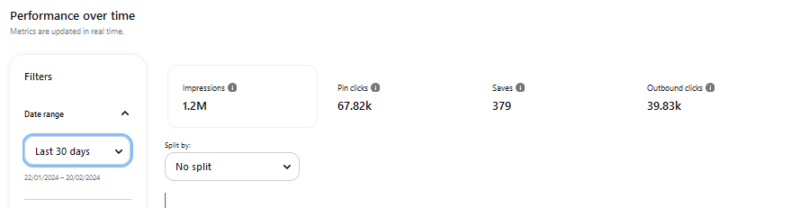
The above stats are from one of my Pinterest client’s pins. Again this pin has textual overlay with an intriguing CTA that piques interest (more about this below). In just a 30 days period this one pin drove almost 40,000 outbound clicks to their site, and the pin continues to drive a huge amount of traffic and engagement.
Read on to find out some more key elements that can help increase engagements on your pins.
A FEW OTHER THINGS TO CONSIDER WHEN CREATING SUCCESSFUL PINTEREST PINS
There’s a lot of moving parts to a successful pin, and of course content is a HUGE FACTOR. Understanding how people use Pinterest is key. A couple of things to keep in mind are that pinners are planners, that means that they often come to Pinterest looking for ideas way before the event. So that means optimising for saves.
Saves are Important on Pinterest
Saves are a huge element of Pinterest’s algorithm and I wrote more about saves in this post. That post contains lots of other useful information to help you create a winning Pinterest strategy.
Novelty on Pinterest
People come to Pinterest looking for ideas to try and inspiration for their daily lives as well as big life events (like weddings). But something I’ve noticed that really works on Pinterest is the idea of novelty. People like unique ideas, something they’ve never seen before.
It can be something simple like how to upcycle plastic bottles to IKEA hacks to new recipe ideas. Novelty definitely helps and Pinterest is the perfect place to try out your new content ideas or product launches.
Pinterest do their Pinterest Predicts every year, you can see the current Pinterest Predicts here. This may give you some ideas for how to spin your pins and give you a unique approach to your niche.
SAVE TO PINTEREST FOR LATER!


Leave a Reply